Introduction
In today’s fast-paced world, keeping your home impeccably clean can feel like an impossible task. Enter the DREAME L10s Pro Ultra Heat Robot Vacuum and Mop Combo – a next-generation cleaning powerhouse designed to automate your floor care routine. Combining 7,000Pa of suction, advanced mop technologies, hot water self-cleaning, and obstacle avoidance, this smart robot is built to tackle dirt, hair, and debris on hard floors and carpets alike. In this comprehensive guide, we’ll walk you through every aspect of setting up, using, and maintaining your L10s Pro to ensure you enjoy spotless floors with minimal effort.
Getting Started with the DREAME L10s Pro
Unboxing and Initial Setup
The excitement of bringing home a new smart appliance begins at unboxing. Inside the box, you’ll find:
- DREAME L10s Pro robot vacuum and mop unit
- Charging dock with power adapter
- Pre-installed mop pad and water tank
- Extra set of mop pads
- User manual and quick-start guide
- Boundary strips (if provided)
Start by placing the charging dock against a wall in an open area. Ensure there’s at least 1.5 feet of clearance on both sides and 4 feet in front, so the robot can dock and undock freely. Plug in the dock and place the L10s Pro on the charging pins. A full charge takes roughly 3–4 hours, after which you’re ready to tackle your first cleaning cycle.
Connecting to Your Wi-Fi and App Setup
To unlock the full potential of the L10s Pro, download the DreameHome app (available for iOS and Android). The pairing process is straightforward:
- Open the app and create an account.
- Select “Add Device” and choose the L10s Pro from the list.
- Follow the on-screen prompts to connect to your 2.4GHz Wi-Fi network (5GHz is not supported).
- Assign the device a name (e.g., “Living Room Robot”) and let it update its firmware if prompted.
Once connected, you can start scheduling cleans, customizing cleaning zones, and monitoring performance in real time.
Key Features Explained
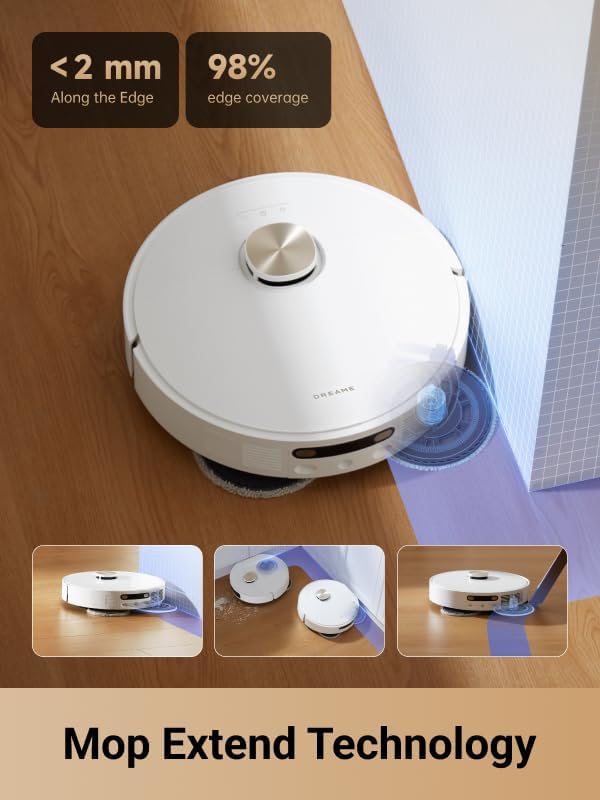
MopExtend Technology for In-Depth Edge Cleaning
Traditional robot mops often miss snug corners and edges, leaving behind stubborn crumbs. The L10s Pro’s MopExtend technology changes the game by:
- Detecting wall margins with precision.
- Extending the mop pad outward by several centimeters to reach edges.
- Retracting the pad to avoid obstacles once edge cleaning is complete.
Whether it’s cereal spills along baseboards or pet hair trapped in corners, MopExtend ensures no area goes uncleaned.
136°F Hot Water Self-Cleaning
One of the standout features of the DREAME L10s Pro is its hot water self-cleaning system. After each mop cycle, the robot returns to its docking station where:
- 136°F hot water is pumped through the mop pads to dissolve grime.
- Heated air dries the pads, preventing mold and unpleasant odors.
This fully automated maintenance routine means you no longer have to handle dirty cloths or manually rinse mop pads – the robot does it all.
7,000Pa Mega Suction Mastery
With a powerful 7,000Pa suction, the L10s Pro adapts seamlessly from hardwood floors to area rugs and carpets. Benefits include:
- Rapid pickup of fine dust, larger debris, and pet hair.
- Adjustable suction levels through the app (quiet mode, standard, max).
- Improved edge cleaning thanks to concentrated airflow.
Even in high-traffic zones or homes with shedding pets, you’ll notice a consistently thorough clean.
Mop Rewashing and Floor Remopping for Thorough Cleaning
Thanks to advanced dirt detection sensors, the L10s Pro evaluates the cleanliness of both the floor and its own mop pads. When excess dirt is detected, it performs:
- A rewashing cycle to clean the mop pad again.
- A second mopping pass over areas that remain dirty.
This dual-action approach guarantees sparkling floors in kitchens, entryways, and other high-mess spots.
Smart Obstacle Avoidance and Precise Mapping
Cluttered spaces pose no challenge for the L10s Pro. Using 3D structured light and AI recognition, it can identify and avoid over 55 different object types – from shoes and cables to small furniture legs. Meanwhile, LiDAR mapping technology creates an accurate floor plan, allowing you to:
- Zone specific rooms or sections for targeted cleaning.
- Set virtual no-go areas to protect delicate items.
- Track cleaning sessions with detailed real-time maps.
Featured Deal: DREAME L10s Pro Ultra Heat Robot Vacuum and Mop Combo
Don’t miss out on this smart home essential. Check the latest price and availability on Amazon.
Tips for Optimal Cleaning Performance
Setting Cleaning Schedules
Consistency is key to maintaining a truly clean home. With the DreameHome app, you can:
- Schedule daily cleans at convenient times (e.g., while you’re at work).
- Assign different suction and mopping intensities based on room usage.
- Create one-off cleans for unexpected messes (think kid’s crafting session or after-party crumbs).
Let your robot handle routine mess so you can focus on more important tasks.
Managing Virtual Boundaries
Protect fragile décor or pet feeding areas by drawing virtual lines or boxes on your map. The L10s Pro will automatically steer clear of these zones, ensuring delicate items remain safe. You can:
- Block off pet bowls to avoid water spills.
- Exclude children’s play areas to avoid toy cluster jams.
- Restrict mopping in carpeted rooms.
Maintaining Your Robot for Longevity
Routine checks will keep your L10s Pro running smoothly for years. Every one to two weeks, you should:
- Empty the dustbin and clean the filter.
- Inspect the main brush for hair wrap and debris.
- Wipe sensors and charging contacts with a dry cloth.
Following these simple maintenance steps prevents performance drop-off and keeps cleaning cycles efficient.
Advanced Maintenance Guide
Cleaning the Dustbin and Filters
1. Remove the dustbin by pressing the release button.
2. Empty contents into a trash can and rinse the bin under running water. Let it air-dry completely.
3. Tap the multi-layer filter gently to remove debris. Replace the filter every 2–3 months or as recommended.
Maintaining the Mop Pads and Water Tanks
Thanks to the L10s Pro’s hot water cleaning, mop pads stay fresher longer. However, periodic manual cleaning helps:
- Detach the mop pad and rinse under warm water with mild detergent.
- Allow complete air-dry before reattaching.
- Refill the clean water tank and empty the dirty water reservoir after each full mop cycle.
Frequently Asked Questions
- Q: Can the L10s Pro handle high-pile carpets?
A: Yes, the robot adapts suction power up to 7,000Pa, effectively transitioning from hard floors to medium-pile carpets. High-pile rugs may require spot cleaning. - Q: Does the robot support voice assistants?
A: The DreameHome app currently integrates with Alexa and Google Assistant, allowing you to start, pause, or return-to-dock with simple voice commands. - Q: How often should I replace the mop pads?
A: Mop pad lifespan depends on usage frequency. For typical homes, replacing unwashed pads every 3–6 months is ideal.
Conclusion
The DREAME L10s Pro Ultra Heat Robot Vacuum and Mop Combo is a game-changer for busy households, pet owners, and anyone seeking pristine floors without the manual labor. From its innovative MopExtend technology to the 136°F hot water self-cleaning system and powerful 7,000Pa suction, this robot is engineered to deliver consistently superior results.
If you’re ready to simplify your cleaning routine and enjoy more free time, don’t wait. Secure your DREAME L10s Pro now at an unbeatable price on Amazon:
Get the DREAME L10s Pro on Amazon Today